Account code alias
An account code alias is an alternate code that helps bill imports succeed when the account code in the import file doesn't exactly match what's stored in EnergyCAP.
- You can add up to five aliases per account.
- Aliases can be added when editing an account or from the Bill Import Errors screen.
- During import, EnergyCAP checks the account code on each bill against these aliases. If the code matches an alias, the bill is imported instead of being rejected.
- Aliases cannot be updated or viewed in an update spreadsheet.
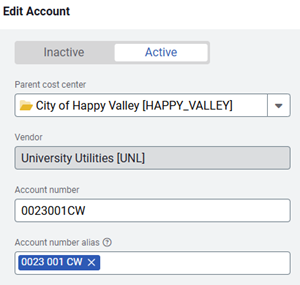
When to update the account code vs. add an alias
Add an alias when
-
The account code in your bill import file doesn’t exactly match the account code printed on the utility bill and already stored in EnergyCAP.
- Common examples:
- Extra characters appear in the import file (for example, leading zeros, suffixes).
- Formatting differences occur (for example, dashes vs. no dashes).
Adding an alias lets EnergyCAP match these variations to the correct account without changing the true account number.
Update the account code when
-
The utility vendor changes the account number on the actual bill.
-
In this case, the number stored in EnergyCAP is no longer current, so you should update the account record to reflect the new official account code.