Unlink an account from a meter
Last updated April 30, 2026
Meters must be linked to an account to enter bills. If a meter is linked incorrectly, you can remove the connection and link it to the correct account.
You can unlink a meter and account from either the Account or Meter record.
When to unlink an account and meter
- A meter is linked to the wrong account.
- An account has multiple meters, and you need to remove one.
- You need to reassign a meter to a different account.
Key details
- If a meter is not linked to an account, you cannot enter bills for that meter.
- If a meter is inactive but still linked to an active account, you can still enter bills.
Example
If a meter is linked to the wrong account:
- Unlink the meter from the current account.
- Link the meter to the correct account.
Steps to unlink an account and meter
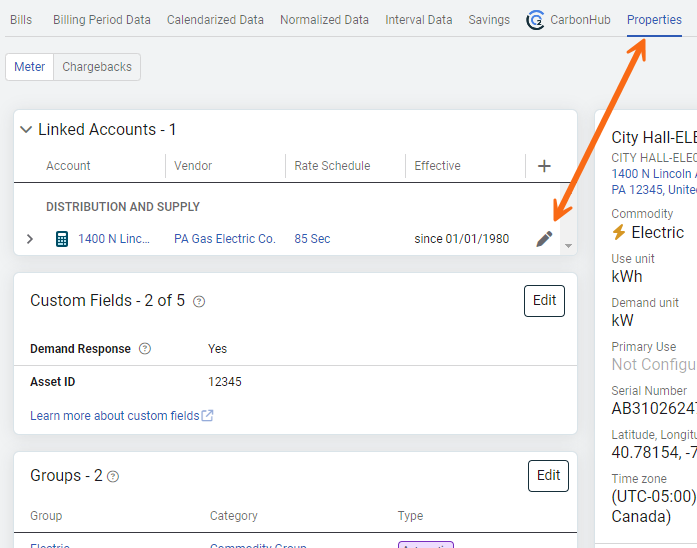
- On the Properties tab of an account or meter.
- Click Edit Linked Meter or Edit Linked Account. (The pencil icon in the card.)
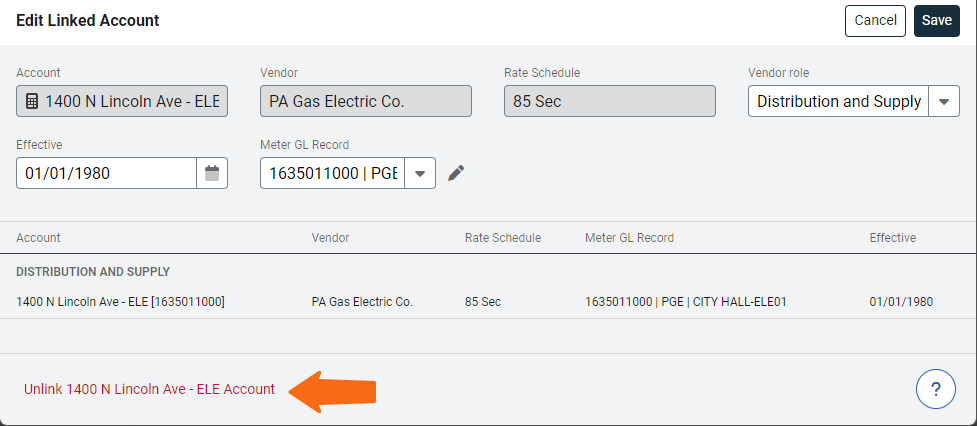
- After the dialog opens, at the bottom, select Unlink (text in red).
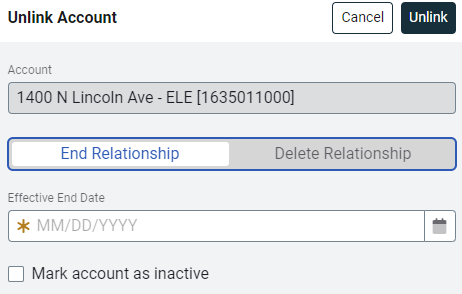
- Choose one of the following to unlink the account and meter:
End Relationship - Set an effective end date.
Delete Relationship - Completely remove the link.
Options for End Relationship
- You cannot enter bills with a start date AFTER the effective end date.
- You can edit existing bills.
Options for Delete Relationship
- No bills can be entered for this meter on this account.
- Historical bill data is not affected or deleted.
- The link from the account to the meter is removed.
- You can edit existing bills.