Bill export overview
Last updated May 5, 2026
The bill export process marks bills as exported and prepares them for import into an accounting system.
Bill export process
- Creates an output file, most often used for AP or GL purposes.
- Marks bills as exported.
Bill export is part of the accounting workflow
- Pay vendor bills (Accounts payable function).
- Distribute costs from bills across various sites, departments, etc. (General ledger function).
What happens when a bill is flagged and held from export?
When a bill is both flagged and held from export, resolving the flag does not automatically release the bill for export.
You must manually remove the hold from export. This is a separate action.
Bill export workflow example
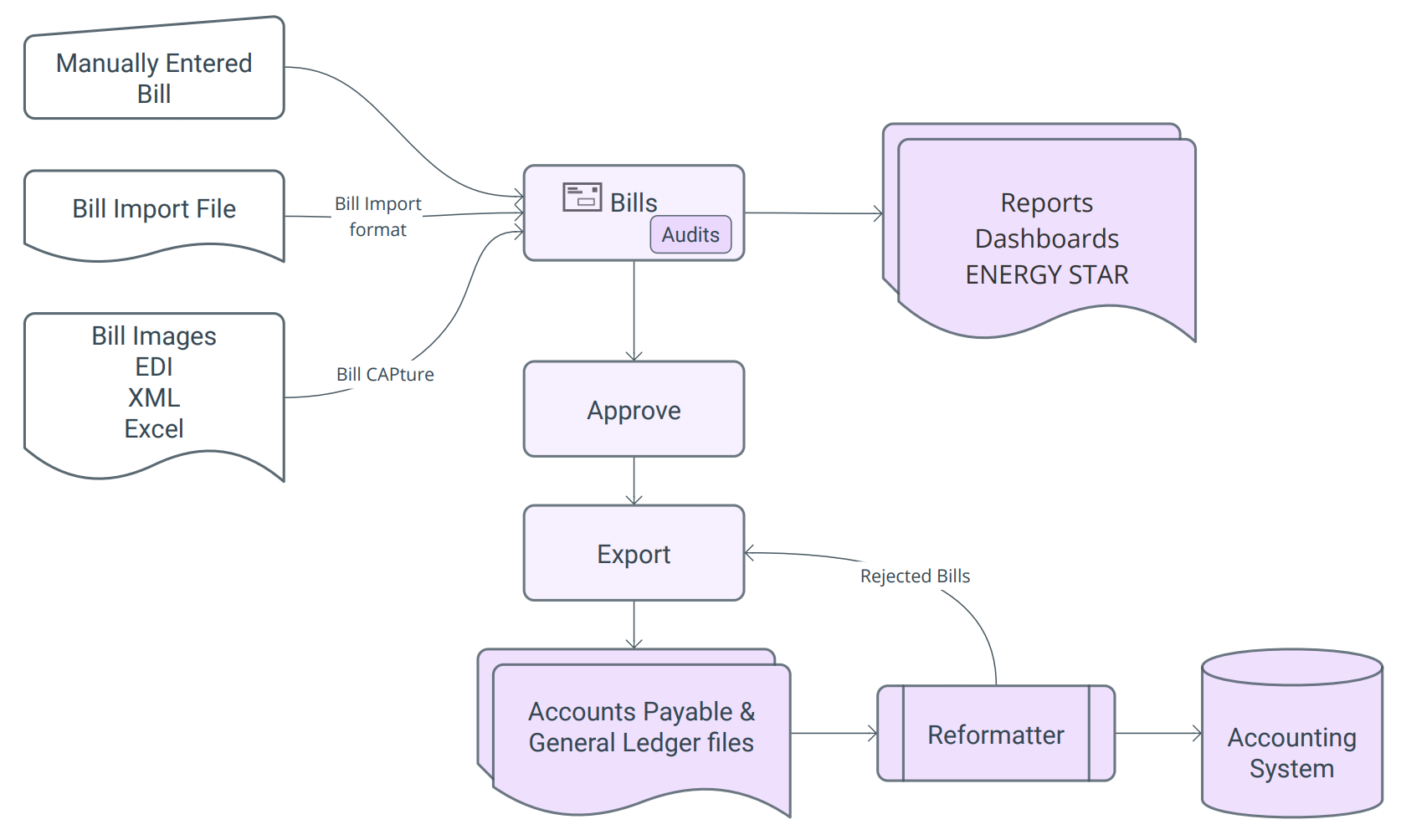
- Enter or import bills: with Bill Capture, bill import, or manual entry.
- Audit: check for errors before approving bills.
- Approve: use a bill list to view and approve bills.
- Export bills: manual or automated export to AP or GL. A maximum of 10,000 bills can be exported at one time.
- Reformat bills: reformat the EnergyCAP file to match your accounting system format.
Automation can replace steps 4 and 5, automate bill export, reformat bills, and upload the file to an Accounting system.
Bill export diagram
Permissions
A roles and permissions audit report is available for download on the Users and Roles page. The report lists each role and the permissions assigned to it. It does not include per-user login timestamps or user activity data.
Custom user roles are created by administrators.