Bill Capture audits
Last updated May 22, 2026
Bills processed through Bill Capture go through the same bill audits that apply to manually entered or imported bills. Audits check for data quality issues such as cost or usage outside expected ranges, missing values, billing period mismatches, and duplicates.
Clients are responsible for reviewing and resolving any flagged bills.
When audits run
Audits run at two points in the Bill Capture workflow:
- At upload — EnergyCAP screens files for duplicates as they are uploaded, before the bill record is created. Flagged duplicates can be removed or allowed to continue processing. See Duplicate bill detection.
- After the bill is created — after a bill record exists, the full set of bill audits runs (including the duplicate bill audit, which is the post-creation counterpart to upload-time duplicate detection). Flagged bills appear in the same flagged-items views as bills from any other source.
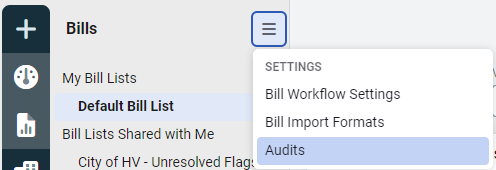
You control which audits run and how they behave through the Audits settings in the Bills module menu.
Flag vs. Flag and Hold
Each audit can be configured with one of two behaviors:
- Flag — the bill is marked for review but continues through approval and export.
- Flag and Hold — the bill is marked for review and held from export until the flag is resolved. Use this for audits where the data issue should block downstream accounting.
Reviewing audit results from batch notifications
When a Bill Capture batch finishes processing, the batch notification includes links to reports that summarize audit results for that batch — including Report-09 (Bill PDF) for flagged bills, Report-12 (Visual Bill Audit) for account and meter trend context, and Report-27 (Bill Flags) for the full list of flagged bills with flag details. See Bill Capture reports for the full list and Notifications to configure how you receive them.
Total pay amount audit
When the line item Total Pay Amount is added to the Total cost mismatch audit and either Flag or Flag and Hold is selected, this audit:
- Compares the Total Due line on your vendor bill against the calculated Total Pay Amount in EnergyCAP, and
- Flags any bills where the Total Due and Total Pay Amount values don't match.

If the audit is set to Flag and Hold, the bill is held from export for manual review.
For more on the Total Pay Amount audit, see the Bill Capture FAQ.
Frequently asked
Do Bill Capture bills get the same audits as manually entered bills?
Yes. The full set of bill audits applies to bills created through Bill Capture, with the addition of upload-time duplicate detection that runs before the bill record is created.
When does duplicate detection happen?
Both at upload (before the bill record exists) and as the duplicate bill audit (after the bill record is created). The two layers catch duplicates introduced at different points in the workflow.
Where do I see audit flags for Bill Capture bills?
Flagged bills appear in the standard flagged-items views in the Bills module, alongside flagged bills from any other source.
What’s the difference between Flag and Flag and Hold?
Flag marks the bill for review but lets it continue through approval and export. Flag and Hold marks the bill and blocks export until the flag is resolved.